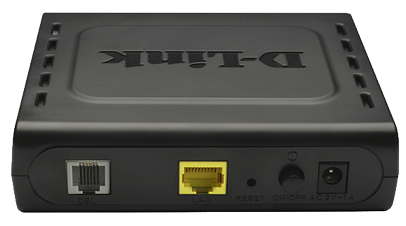
D-Link DSL-320B: A truly awful modem
The irony of this post is that, only a few days ago, I was singing the praises of the D-Link DSL-320B. Sadly, I was more than a little wrong. This modem has turned out to be a shocking piece of software engineeringWikipedia: Software engineering (SE) is the application of a systematic, disciplined, quantifiable approach to the design, development, operation, and maintenance of software, and the study of these approaches; ... and has stolen many hours of my life, that I will never get back.
When in 1483 Bridged IP mode, the modem was actually fine. It connected to the ISP and allowed the routing of a subnet over it. When I switched to a new ISP, which used PPPoA, the story was somewhat different. The setup is such that the PPPoA connection gets issued its own IP address, outside of the routed subnet, and then the subnet is routed over this. This modem implements a system called half-bridgingWikipedia: Network bridging describes the action taken by network equipment to allow two or more communication networks, or two or more network segments,[1] to create an aggregate network. Bridging is distinct f...… in a horrible horrible way. A way which, in fact, kills kittens. Poor poor kittens.
When you first connect a computer to the modem, its DHCPWikipedia: The Dynamic Host Configuration Protocol (DHCP) is a network protocol used to configure devices that are connected to a network (known as hosts) so they can communicate on that network using the Intern... server issues the computer with an IP address from the DHCP range – lets say 192.168.1.2. It also issues the computer with its own local address as the gateway – lets say 192.168.1.1. Once the PPPoA connection has established it re-issues the DHCP lease, giving the computer the public IP address (e.g. 62.132.23.205 ) as well as its local address as the gateway. As such, your IP configuration looks a little like this:
IPv4 Address. . . . . . . . . . . : 62.132.23.205
Subnet Mask . . . . . . . . . . . : 255.255.255.255
Default Gateway . . . . . . . . . : 192.168.1.1
The more observant of you will be scratching your head with bewilderment now. The computer is now in a subnet all of its own, as dictated by the subnet mask, but is using an IP in an entirely different subnet as its gateway. It seems to use a system of sending ARPWikipedia: Address Resolution Protocol (ARP) is a telecommunications protocol used for resolution of network layer addresses into link layer addresses, a critical function in multiple-access networks. ARP was de... replies frequently, to ensure that the computer always knows the MAC address of the 192.168.1.1 host – since it won’t ARP for it itself. This didn’t seem to work with my BSD based router, which plain refused to add a gateway which was not on the same subnet. I don’t really blame it. It seems this modem was designed for Windows.
Anyway, the plot thickened further. To allow bridging, the modem uses a route which routes all packets out of the PPP interface. This route is only added after the second DHCP lease has been successfully issued. It does not appear to be possible, inside its interface or via telnet, to add this route manually. As such, it was possible to con the modem into working as a full bridge by using a Windows computer to get a DHCP lease and then connecting the modem to a network of devices which used IPs in the routed subnet. This was a poor solution as the DHCP lease expired every 10 or so hours, thus this process needed to be repeated frequently to get Internet connectivity back. Further to that, if you turned off the DHCP server, it was impossible to connect to the Internet using the modem in PPPoA mode.
As a side note, if you set the MTU of this modem’s PPPoA connection to 1500, it resets itself to factory settings. Useful, eh?
In the end, I opted to buy a Thomson Speedtouch 546 which works wonderfully.
Using BE Unlimited with another modem
I’m canceling my BE contract and need to return the BE Box to them. I’m getting a VDSL2+Wikipedia: Very-high-bit-rate digital subscriber line 2 (VDSL2) is an access technology that exploits the existing infrastructure of copper wires that were originally deployed for traditional telephone service a... connection with an ADSL2+Wikipedia: ITU G.992.5 is an ITU (International Telecommunication Union) standard, also referred to as ADSL2+ or G.DMT.bis+. Commercially, it is notable for its maximum theoretical download speed of 24 Mbit/s. backup, for which I needed a standard ADSL2+ modemWikipedia: A modem (modulator-demodulator) is a device that modulates an analog carrier signal to encode digital information, and also demodulates such a carrier signal to decode the transmitted information. The... for. Because it was going cheap on eBay, I went with the D-Link DSL-320B. This is actually a really good modem in such that it has a decent web interface supporting many different types of connection as well as telnetWikipedia: Telnet is a network protocol used on the Internet or local area networks to provide a bidirectional interactive text-oriented communication facility using a virtual terminal connection. User data is i... access to a powerful command line to do things like static routes.
To configure a modem such as this on BE Unlimited, you need the following settings:
Type: 1483 Bridged IP LLC
VPI: 0
VCI: 101
Note that this is NOT PPPoATMWikipedia: The Point-to-Point Protocol over ATM (PPPoA) is a network protocol for encapsulating PPP frames in AAL5. It is used mainly with DOCSIS and DSL carriers. or PPPoEWikipedia: The Point-to-Point Protocol over Ethernet (PPPoE) is a network protocol for encapsulating PPP frames inside Ethernet frames. It is used mainly either: and, as such, doesn’t require a username/password.
Following this, you can then assign your router your issued static IP address(es), or set its WAN interface to use DHCP, if you have a dynamic IP.
My DSL-320B reports the cable status as being “Up” but the ADSL status as being “disconnected”. I assume that this is because it has not dialed a connection. It works fine, despite this.
My sync rates with the new modem are about what they were before:
Downstream Line Rate (Kbps) : 17301 Upstream Line Rate (Kbps) : 2342
My speedtest.net results show higher upstream than before, however this may just be the way the cookie crumbled with the speed test: