 Posted by
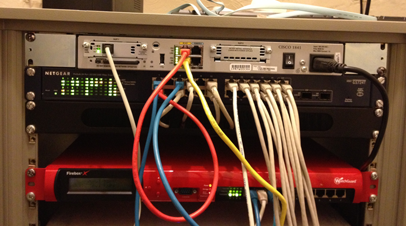
 This method will monitor a connection via ICMP ping and, on failure, it will bring up the ADSL line. Below is my setup – you may need to tailor this guide to yours. This method is useful if both connections cannot be up at the same time (possibly because they share an IP address).
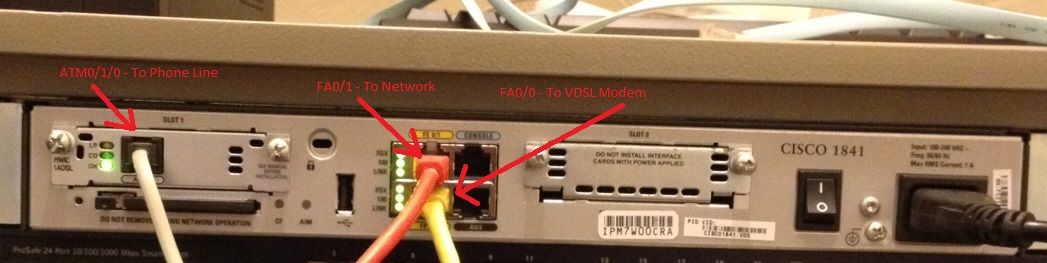
- Dialer0 is a PPPoE dialer to a VDSL modem via fa0/0
- Dialer1 is a PPPoATM dialer of ADSL via ATM0/1/0
- The IP I am pinging to detect failure is 83.218.143.225
- The ATM0/1/0 interface is shutdown when not in use
First we’ll add a Track and IP SLA to monitor our primary connection (Dialer0) by pinging our monitor IP (83.218.143.225). This track configuration delays actioning a failure for 10 seconds and a restore by 60 seconds. This is to prevent flip-flopping on the lines:


delay down 10 up 60
ip sla 123
icmp-echo 83.218.143.225 source-interface Dialer0
timeout 2000
frequency 4
ip sla schedule 123 life forever start-time now
Next we’ll add default routes for Dialer0 (linked to Track1) and Dialer1 (with a higher metric). If you already have default routes, remove these first:
ip route 0.0.0.0 0.0.0.0 Dialer1 254
Finally we’ll use EEM applets to monitor track 1 and bring up the ATM interface on failure (and visa versa). This also e-mails us about the event:
event track 1 state down
action 1.0 cli command "enable"
action 2.0 cli command "config terminal"
action 3.0 cli command "interface atm0/1/0"
action 4.0 cli command "no shutdown"
action 5.0 mail server "55.33.44.22" to "to@mail.com" from "from@mail.com" subject "IP SLA 123 Timeout" body "Timeout on primary line"
event manager applet TRACK-1-OK
event track 1 state up
action 1.0 cli command "enable"
action 2.0 cli command "config terminal"
action 3.0 cli command "interface atm0/1/0"
action 4.0 cli command "shutdown"
action 5.0 mail server "55.33.44.22" to "to@mail.com" from "from@mail.com" subject "IP SLA 123 Restored" body "Primary line restored"
You should replace 55.33.44.22 with a valid SMTP server that this router has access to send through and change to@mail.com/from@mail.com to the to/from e-mail addresses respectively.
A full example config (with some bits redacted) can be found here.